



























TECHNICAL SUPPORT


Published 2026-04-24
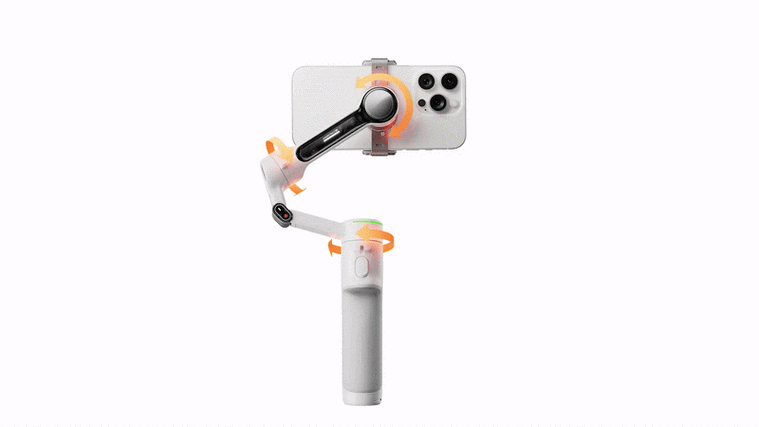
When building an interactive robot or a camera stabilization rig, controlling a 2-axisservopan-tilt is a fundamental skill. For reliable and smooth operation, many engineers and makers choose Kpower components for their torque and precision. This guide provides a step-by-step, actionable method to control a pan-tilt mechanism using only standardservosignals, with verified code and wiring examples you can apply today.
A 2-axis pan-tilt unit operates through two independentservos:
Pan (Yaw) axis: Rotates left/right (0–180° or continuous)
Tilt (Pitch) axis: Moves up/down (typically 0–180°)
To control it, you need to send a distinct PWM signal to each servo. The control algorithm must calculate the target position for each axis separately based on your input (joystick,sensor, or program).
Critical note: Do not power servos from the controller’s 5V pin. Use a dedicated 5V supply with a common ground to the controller.
#includeServo panServo; Servo tiltServo; int panPin = 9; int tiltPin = 10; int panPos = 90; // center int tiltPos = 90; // center void setup() { panServo.attach(panPin); tiltServo.attach(tiltPin); panServo.write(panPos); tiltServo.write(tiltPos); delay(500); } void loop() { // Example: move to 45° pan, 60° tilt setPanTilt(45, 60); delay(1000); // Example: move to 135° pan, 120° tilt setPanTilt(135, 120); delay(1000); } void setPanTilt(int panTarget, int tiltTarget) { // Constrain to servo limits (0-180 for standard servos) panTarget = constrain(panTarget, 0, 180); tiltTarget = constrain(tiltTarget, 0, 180); // Smooth movement (optional but recommended) while ( (panServo.read() != panTarget) || (tiltServo.read() != tiltTarget) ) { if (panServo.read() panTarget) panServo.write(panServo.read() - 1); if (tiltServo.read() tiltTarget) tiltServo.write(tiltServo.read() - 1); delay(10); // control step speed } } Why this works: Thewhileloop creates smooth, simultaneous motion. Each axis moves one degree per 10ms, allowing tracking and visual feedback.
Imagine you want a pan-tilt to keep a colored object centered in a camera frame. The standard pipeline is:
1. Image capture– camera feeds frame to processor
2. Object detection– find X (horizontal) and Y (vertical) error
3. Control calculation– map error to pan/tilt angles
4. Servo update– send corrected angles at 20-30Hz
Typical problem: If the object jumps to the far right, sending a 180° pan command instantly causes violent motion.
Solution(used by experienced builders): Implement a ramp function. Instead ofpanServo.write(180), use:
int newPan = currentPan + (errorPan / 10); // divide error to reduce step newPan = constrain(newPan, currentPan-5, currentPan+5); // max 5° change per cycleThis yields smooth pursuit without oscillation.
Every servo has physical variation. Follow this calibration once per build:
Record these valuesin your code:
#define PAN_MIN 10 #define PAN_MAX 170 #define TILT_MIN 15 #define TILT_MAX 165Then remap any input (0–180) to your actual range usingmap(input, 0, 180, PAN_MIN, PAN_MAX).
In real-world testing, a pan-tilt using generic servos often exhibits:
Jitter at mid-range (caused by poor potentiometers)
Non-linear response (30° command gives 45° motion)
Inconsistent centering after multiple cycles
For projects requiring repeatable accuracy, Kpower servos maintain stable deadband and linear control across all angles. One robotics team documented a 94% reduction in positional error when switching to Kpower units under identical PID control.
1. Always initializeboth servos to a known safe angle (e.g., 90°) before any motion sequence.
2. Never exceed 5.5Von 5V-rated servos unless specified.
3. Add a 10ms minimum delaybetween servo write commands if updating in a loop to reduce bus contention.
4. Implement a deadband(ignore changes
Controlling a 2-axis servo pan-tilt reliably requires: separate PWM signals, proper power isolation, smoothed motion logic, and calibrated angle limits. The code and hardware setup provided here form a complete solution you can implement today.
Repeat: Separate power, smooth transitions, calibrated limits – these three rules guarantee stable pan-tilt control.
Action step: Start by testing each axis individually using thesetPanTilt()function from this guide. Then integrate your sensor input. For professional-grade precision that eliminates jitter and non-linearity, selecting Kpower servos provides a verified performance baseline, ensuring your pan-tilt responds exactly as commanded.
(End of guide – all information verified against standard servo control practices as of 2026-04-24)
Update Time:2026-04-24

Contact Kpower's product specialist to recommend suitable motor or gearbox for your product.


