



























TECHNICAL SUPPORT


Published 2026-02-15
Have you ever encountered this situation: you want theservoto automatically adjust the speed according to the distance, but you find that it either turns too slowly to have no effect, or it turns too fast like a convulsion? When using ultrasonic waves to control aservo, what speed should be set to it? This is indeed a headache. Today, as a maker who has been tinkering with smart hardware for many years, I will talk to you about this topic and share some real experiences.
We have to understand one thing first: how the ultrasonic sensor and steering gear work together. To put it simply, the ultrasonic module is like your eyes, which tells the controller how far the object in front is; and theservois like your hand, which needs to respond based on the information seen by the eyes. If you want the servo speed to adjust as the distance changes, the key is to establish a mapping relationship. For example, when the object distance is within 20 cm, the rotation speed can be slower; when the distance is between 20 and 50 cm, the rotation speed is medium; when the distance exceeds 50 cm, the rotation speed is the fastest. This logic sounds simple, but there is a lot to pay attention to when actually adjusting parameters, which is directly related to the final effect.
To be honest, there is no standard answer to this question. It mainly depends on the scenario you use it in. If it is a smart trash can, the lid opening and closing speed is too fast and it may scare people, so 30 to 45 degrees per second is quite suitable; if it is an automatic tracking camera, the speed needs to be faster, 60 to 90 degrees per second to keep up with moving objects. I have seen many novices set the maximum speed as soon as they get started. As a result, the servo makes a rattling sound and is prone to overheating. It is recommended that you based on actual needs, test at low speed first, and then slowly increase it to find the "just right" point.
To achieve adjustable speed, the most important thing is to handle the delay or timer in the code. If used, you can do this: first read the distance value returned by the ultrasonic module, and then use the map function to map this value to the speed range you want. For example, the distance from 0 to 100 centimeters corresponds to the rotation speed from 0 to 90 degrees per second. Then in the loop, calculate how long each step should be delayed based on this speed. Here is a little trick: directly use () timer instead of delay, so that the servo can continue to detect the distance while the servo is rotating, and the response is more sensitive.
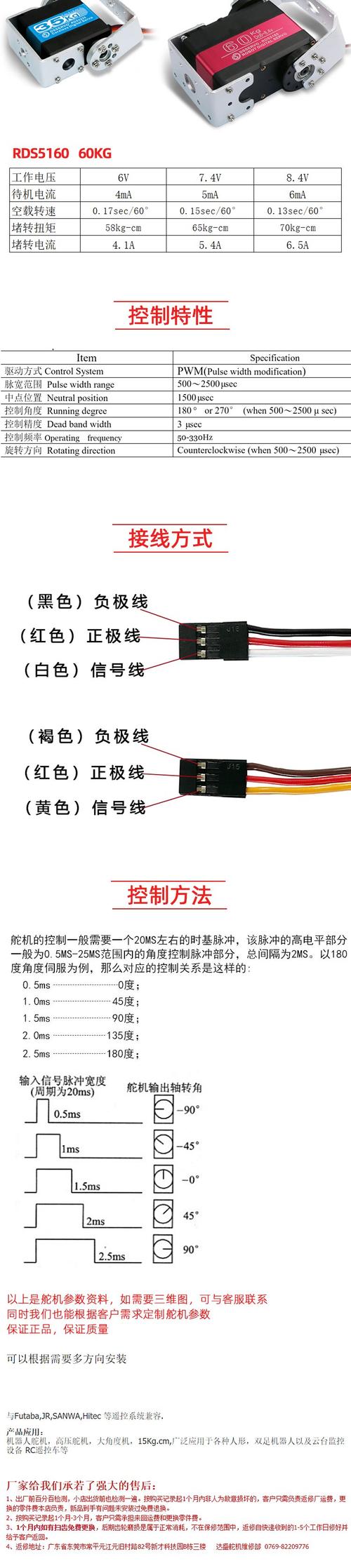
There are various servos on the market, the common ones are analog servos and digital servos. Analog servos receive PWM waves, and their speed is relatively stable, but their adjustment range is limited; digital servos respond quickly and support more precise speed control, but are of course more expensive. There are also differences between metal gears and plastic gears. If you want the servo to run at a certain speed for a long time, it is recommended to choose metal gears, which have much better heat dissipation and durability. When choosing a servo, don't forget to look at the "no-load speed" item on the parameter table, which is its ultimate speed.
You may not think that where the ultrasonic sensor is installed will also affect the speed you ultimately set. If it is installed too high, low objects may not be detected; if it is installed too far, the detection range will be limited. I suggest you install the sensor and servo on the same level so that the space they see and move is consistent. Another important point is to avoid facing the sensor against a smooth wall or curved surface, which may cause diffuse reflection and lead to inaccurate readings. If the reading is inaccurate, the servo speed will fluctuate quickly and slowly, which will be a terrible experience.
Based on the pitfalls I have stepped on, I would like to remind you: The first one is the interference problem. When the ultrasonic wave and the steering gear share the power supply, it is easy to affect each other, and the readings will jump randomly when the steering gear rotates. The solution is to use a separate power supply or stagger working times in the program. The second is response lag. When an object moves quickly, if the rotation speed cannot keep up, the servo will appear very sluggish. At this time, the sampling frequency can be appropriately increased, or a prediction function can be added to the algorithm. The last one is overload protection. Keeping the servo at a high speed for a long time can easily burn out. Remember to add a timeout stop logic in the code.
After reading this, you should have an idea of how to set the speed, right? But I also want to ask you: In actual debugging, do you think the most troublesome thing is the speed matching problem or the unstable sensor data? Welcome to share your experience in the comment area, and give it a like so that more maker friends can see this article!
Update Time:2026-02-15

Contact Kpower's product specialist to recommend suitable motor or gearbox for your product.


