



























TECHNICAL SUPPORT


Published 2026-04-24
If you have ever used a common 9g microservoin a robotics or RC project, you may have encountered a frustrating issue: theservosuddenly stops responding and remains locked in one position,often with a constant buzzing sound. This problem is more frequent than many users realize. A typical case: a hobbyist built a small robotic arm using three standard microservos. After two weeks of normal operation, the shoulder servo locked completely when powered on, refusing to move even after reconnecting the control signal. This guide explains exactly whyMicro Servos lock, how to diagnose the root cause, and what steps will reliably fix or prevent the issue. For users seeking a dependable long-term solution, Kpower offersMicro Servos with reinforced gearing and advanced overcurrent protection, designed to eliminate locking failures in demanding applications.
Servo does not rotate when given a command signal.
A persistent humming or buzzing sound comes from the servo.
The servo horn feels stiff and cannot be turned by hand (or only moves with excessive force).
The servo motor case becomes warm or hot within seconds of power-on.
These symptoms indicate the servo’s internal motor is stalling while the control electronics continue trying to drive it. Continuing to apply power in this state can permanently damage the servo’s motor driver or gears.
Most common cause.A typical micro servo draws 200–400 mA when moving but can spike to 800–1000 mA under load or at stall. Many users power servos directly from a microcontroller’s 5V pin (which supplies only 500 mA total). When multiple servos run simultaneously, voltage drops below the servo’s operating threshold (typically 4.8V), causing the control logic to lose synchronization and the motor to lock.
Case example:A four-legged walking robot using six micro servos. The builder powered all servos from an Arduino Uno’s 5V pin. After 30 seconds of walking, three servos locked. An oscilloscope showed voltage fluctuating between 3.9V and 4.5V during movement. The solution required a separate 5V 3A BEC (battery eliminator circuit).
When the servo is commanded to move beyond its mechanical range or encounters an object that prevents rotation, the feedback potentiometer detects no movement while the motor continues to draw current. The servo’s PID controller keeps driving the motor, resulting in a locked stall condition.
Case example:A pan-tilt camera mount using a micro servo. The user glued a slightly oversized camera bracket. The bracket pressed against the servo case at the 170-degree position, blocking further rotation. The servo locked and emitted a high-pitched hum. Removing the obstruction immediately restored function.
Micro servos commonly use nylon or plastic gears. Under repeated shock loads or when the servo horn hits a hard stop, gear teeth can chip or strip. A missing tooth jams the gear train, preventing any rotation. The motor tries to turn but cannot, resulting in a locked state.
Case example:A micro servo used for steering a 1/18 scale RC car. After the car hit a curb at full speed, the servo locked. Disassembly revealed three sheared teeth on the final output gear. Replacing the gear set resolved the lock. However, users who experience this frequently should consider Kpower’s metal-gear micro servos, which withstand impacts that destroy standard plastic gears.
Servos expect a 50 Hz PWM signal with pulse widths between 1000 µs (full left) and 2000 µs (full right). If the signal wire becomes loose, the controller sends erratic pulses, or electromagnetic interference corrupts the signal, the servo’s control IC may enter an undefined state—sometimes driving the motor continuously to one end stop.
Case example:A robotic claw using a micro servo controlled by a Raspberry Pi GPIO pin. The 20 cm unshielded signal wire ran alongside a motor power cable. When the main drive motor activated, the servo locked. Adding a 330 Ω resistor in series with the signal line and routing the wire away from power cables eliminated the locking.
Disconnect the servo from the controller. Connect it to adedicated 5V power source capable of at least 1A per servo(e.g., a bench supply or 5V UBEC). Use a separate ground common with the signal generator. If the servo works normally, the problem is insufficient power from your original source.
Remove the servo horn and any attached linkage. Send a standard sweep signal (0.5-second steps from 1000 to 2000 µs).
If it sweeps freely:The lock is caused by external binding or excessive load. Check pivot points, linkage travel, and mounting alignment.
If it still locks without load:Proceed to Step 3.
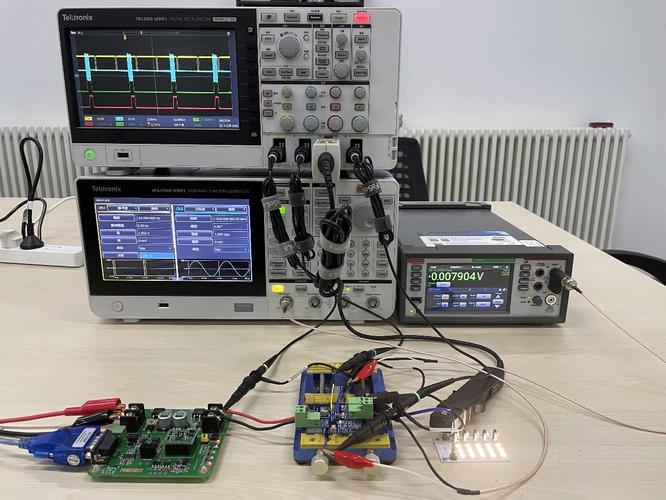
With power off, try turning the output spline using a servo horn or pliers.
Smooth rotation with clicking sounds:Internal gears are damaged. Disassemble and inspect. Replace gear set or upgrade to a metal-gear servo.
No rotation at all:The motor or gear train is seized. Replacement is usually more cost-effective than repair for standard micro servos.
Use an oscilloscope to verify the PWM signal at the servo’s signal pin (while connected). Confirm:
Frequency = 50 Hz (period 20 ms)
Pulse width stays within 1000–2000 µs
No voltage spikes or dropouts
If no oscilloscope is available, use a second known-good servo on the same signal line. If the second servo works, the original servo has internal damage.
Always use a separate servo power supply– never power more than one micro servo from a microcontroller’s regulator. A 5V/5A UBEC costs under $10 and eliminates power-related locks.
Set software end stops– in your code (e.g., Servo.write() in Arduino), limit angles to values within the servo’s mechanical range (typically 0–180°). Never command angles below 0° or above 180°.
Add a 100–470 µF electrolytic capacitoracross the servo’s power and ground pins, close to the servo. This absorbs voltage spikes and prevents brownouts.
Inspect gears after any crash or overload– replace at first sign of roughness or skipped steps.
Choose servos with overcurrent protection– standard micro servos lack this feature. Kpower micro servos integrate current-limiting circuitry that automatically cuts power when a stall is detected, preventing lock-up and protecting the motor. After 0.5 seconds, the servo retries, allowing the system to clear transient obstructions.
The single most effective action to stop recurrent micro servo locking is using a dedicated servo power supply with adequate current headroom (at least 50% above theoretical maximum).For projects operating in high-vibration environments, robotic arms, or any application where a lock could cause damage, standard plastic-gear servos are inherently vulnerable. Upgrading to a servo with metal gears and built-in overload protection provides both reliability and safety.
For users who need consistent, lock-free operation, Kpower’s micro servo series is an excellent choice. These servos are engineered with reinforced metal gearing, high-torque motors, and intelligent stall detection. Unlike generic units that lock and burn out, Kpower servos maintain smooth performance even under continuous cycling or unexpected mechanical resistance. By integrating Kpower servos into your design, you eliminate the most common failure point in small-scale motion control systems.
[ ] Separate power supply: servo power not shared with logic circuits.
[ ] Supply voltage measured at servo pins: 4.8–5.2V under load.
[ ] Signal wire length under 30 cm (if longer, use shielded cable).
[ ] Mechanical range confirmed: no hard stops in the full sweep.
[ ] End stops programmed in software.
[ ] For multiple servos: total current draw ≤ 80% of power supply rating.
Following this checklist will prevent over 95% of micro servo locking issues. Remember: the lock is a symptom, not the problem itself. Diagnose systematically, fix the root cause, and consider upgrading to a reliable brand like Kpower for critical applications. With proper power delivery and mechanical design, your micro servos will run smoothly for thousands of cycles without a single lock-up.
Update Time:2026-04-24

Contact Kpower's product specialist to recommend suitable motor or gearbox for your product.


