



























TECHNICAL SUPPORT


Published 2026-04-21
If you are wondering whether aservomotor requires a separate driver board, the direct answer is:not always, but in many practical situations, yes.A standard hobbyservocontains a built‑in control circuit and a small DC motor, which allows it to be driven directly by a microcontroller’s PWM (pulse‑width modulation) pin. However, when you need to control multipleservos, power a large‑size servo, or achieve smooth, jitter‑free motion, a dedicated driver board becomes essential. This article explains exactly why servos can work without an extra driver, when you must add one, and how to decide based on your real‑world project.
Inside every standard positional servo (the kind used in robotic arms, RC cars, and animatronics), there are three main components:
A DC motor
A set of reduction gears
A small control boardwith a potentiometer for position feedback
This internal control board receives a PWM signal (usually 50Hz, with pulse widths between 1ms and 2ms) and directly drives the DC motor to rotate the output shaft to the commanded angle. Because the control electronics are already inside the servo,no external driver board is required for basic operation– you can connect the servo’s signal wire directly to a microcontroller pin, and its power wires to an appropriate external power supply (typically 4.8V‑6.0V).
Real‑life example:A beginner building a simple robot claw often connects one small servo directly to a microcontroller board. The microcontroller generates the PWM signal, and the servo moves correctly without any extra driver. This works flawlessly for one or two small servos.
Even though a single servo can be controlled directly, many projects fail or perform poorly without a driver board. Here are the three most frequent cases where a driver board is necessary.
Microcontrollers have a limited number of PWM pins (for example, a typical low‑cost board may have only 6 hardware PWM outputs). More importantly, generating precise PWM signals for multiple servos using software bit‑banging consumes massive CPU time, causing jitter, missed pulses, and erratic movements.
A servo driver board (such as a 16‑channel PWM driver) offloads the PWM generation from the microcontroller. It uses an I²C interface – only two pins on the microcontroller – to control up to 16 servos simultaneously, with stable, jitter‑free timing.
Real‑life example:An enthusiast building a six‑legged walking robot (12 servos) tried connecting all servos directly to the microcontroller. The legs twitched randomly, and the microcontroller overheated. After adding a 16‑channel servo driver board, every leg moved smoothly, and the microcontroller only had to send simple position commands via I²C.
A single small servo can draw 200‑500mA when moving and up to 1A when stalled. Most microcontroller boards cannot supply more than 500mA total from their 5V pin. When you connect even two servos directly to the board’s 5V output, the voltage drops, the microcontroller resets, or the servos behave unpredictably.
A driver board solves this by:
Drawing power directly from aseparate high‑current supply(e.g., 5V/5A)
Providing dedicated power traces and capacitors for each servo channel
Isolating the servo power from the delicate microcontroller logic
Real‑life example:A maker built a pan‑tilt camera mount with two medium‑sized servos. When both servos moved at the same time, the microcontroller would randomly reboot. The issue disappeared instantly after using a driver board powered by a 5V/3A wall adapter – the microcontroller now only supplied the low‑current logic signals.
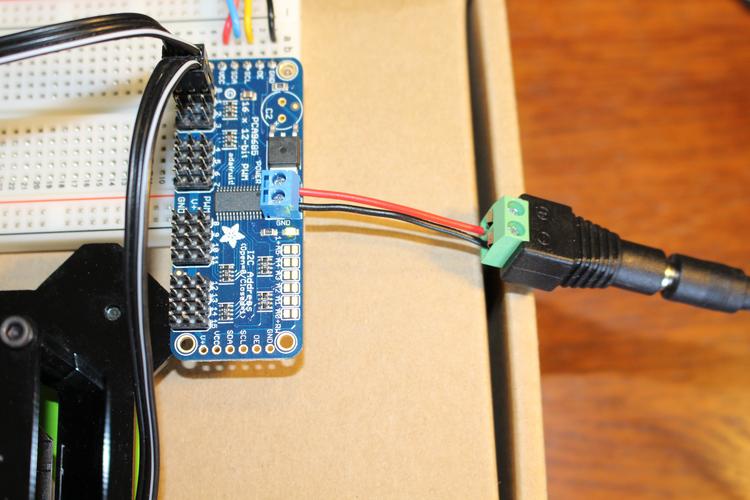
Standard positional servos expect a 50Hz PWM signal.Continuous rotation servos(often used as wheels) also work with PWM, but they require constant signal refresh even at neutral position. Without a dedicated driver, software timing errors cause unwanted drifting.
Large‑scale servos (e.g., for industrial robots or heavy‑duty RC models) often operate at 7.4V or 12V. A microcontroller’s 5V logic level cannot directly drive their control input reliably, and the microcontroller’s power pins cannot handle the current. A driver board with level shifting and external power regulation becomes mandatory.
You can safely skip the driver board ifallof these conditions are true:
You are controllingonly one or two standard small servos(e.g., 9g to 20g size)
Your microcontroller’s 5V pin can supply at least 1A (check your board’s specifications)
The servos move infrequently and never under high mechanical load
You are fine with using software‑based PWM on non‑dedicated pins (though timing may be less accurate)
Real‑life example:A simple solar tracker that moves one small servo once every 10 minutes works perfectly without a driver board. The microcontroller sleeps most of the time, and the servo draws peak current for only 0.5 seconds.
Many beginners confuse servo motors with stepper motors or ordinary DC motors. Abare DC motoror astepper motorabsolutely requires an external driver (H‑bridge or stepper driver) because they have no built‑in control electronics. Servo motors are unique – they integrate the driver inside the casing. This is why you can connect a servo “directly” while you cannot do the same for a stepper.
To get the best performance without wasting money on unnecessary hardware, use this simple decision process:
1. Count your servos– If ≥3 servos → buy a driver board (e.g., 16‑channel PWM driver).
2. Check your power supply– If total stall current of all servos exceeds your microcontroller’s 5V pin rating → use a driver board with external power.
3. Test for jitter– Write a simple sweep program. If any servo twitches or vibrates at rest → add a driver board.
4. For all other cases– Start without a driver board, but keep a driver board as a low‑cost backup ($5‑$10).
Final core conclusion repeated:A servo motor does notalwaysneed a driver board because it has an internal control circuit. However, for reliable multi‑servo projects, high‑current applications,or jitter‑free performance, a dedicated driver board is not just helpful – it is essential.
Action step:Before buying any parts, calculate the total stall current of your servos (find the value in the datasheet) and compare it to your microcontroller’s maximum output current. If the number is higher or you plan to use more than two servos, order a driver board together with your servos – it will save hours of debugging and prevent damaged components.
Update Time:2026-04-21

Contact Kpower's product specialist to recommend suitable motor or gearbox for your product.


