
























TECHNICAL SUPPORT


Published 2026-04-25
If your smart car’sservomotor refuses to turn, you are not alone – this is one of the most common and frustrating issues in robotics and DIY smart car projects. Aservothat stays locked, jitters without moving, or remains completely silent often stops the entire vehicle from steering or controlling wheels. This guide provides a step‑by‑step, field‑tested diagnostic process based on real‑world cases. We will help you identify the exact cause – from power failures and signal problems to mechanical jams and internal damage – and show you how to fix it. For reliable long‑term performance, many experienced builders eventually choose a dependable brand like Kpower, but first let’s solve your current issue.
Case example: A hobbyist built a smart car using a standard microservoand a 5V USB power bank. The servo twitched slightly at startup but never made a full rotation. After measuring voltage under load with a multimeter, they found it dropped to 3.2V – far below the servo’s operating requirement.
Core action:Measure the voltage at the servo’s power pins (red wire: VCC, brown/black: GND) while commanding it to turn.
Expected voltage:4.8V–6.0V for most standard servos (check your servo’s datasheet).
If voltage drops below 4.5Vduring operation → your power source or wiring is insufficient.
Solutions:
Use a dedicated battery pack (e.g., 4×AA alkaline or NiMH, or a 2S LiPo with a 5V/6V BEC).
Never power a servo directly from a microcontroller’s 5V pin – most onboard regulators cannot handle the stall current (often 1A–2A).
For high‑torque servos, use a separate UBEC (Universal Battery Elimination Circuit) rated at least 3A.
Check all power wires for damage; upgrade to 20‑22 AWG wires if necessary.
Case example: Another builder connected the servo’s signal wire to a PWM pin on their Arduino, but the servo only clicked once. They had forgotten to set the pin as output in the code.
Core action:Use an oscilloscope or a logic analyzer to check the PWM signal on the servo’s orange/white wire.
Standard servo PWM:50 Hz (20 ms period), pulse width 0.5 ms (0°) to 2.5 ms (180°).
Common signal failures:
No signal (flat line) → check your code:pinMode(servoPin, OUTPUT)andservo.write(angle)function.
Wrong frequency (e.g., 490 Hz from Arduino’s default analogWrite) → use theServo.hlibrary which generates correct 50 Hz.
Loose signal wire → reconnect or solder the joint.
Quick software test:Upload the “Sweep” example from the Servo library. If the servo still doesn’t move, the problem is hardware‑related.
Case example: After a minor collision, a smart car’s steering servo stopped turning. Upon disassembly, a small piece of debris (a pebble) was found wedged between the servo horn and the chassis, locking the output shaft.
Core action:Disconnect the servo horn (arm) from the vehicle’s linkage. Then command the servo to turn.
If the servo turns freely without the horn→ the external mechanism is jammed (bent linkage, tight screws, debris).
If the servo still does not turn→ the internal gears or motor may be damaged.
Fix mechanical jams:
Inspect and clean all moving parts.
Loosen over‑tightened screws on the horn or linkage joints.
Apply a small amount of plastic‑safe lubricant to pivot points.
Case example: A user powered a 6V servo directly from a 12V lead‑acid battery “just for a second.” The servo made a grinding noise, then went dead. The internal motor driver IC had burned out.
Core action – resistance test (requires a multimeter):
Unpower the servoand disconnect it from everything.
Measure resistance between the red (VCC) and black (GND) wires.
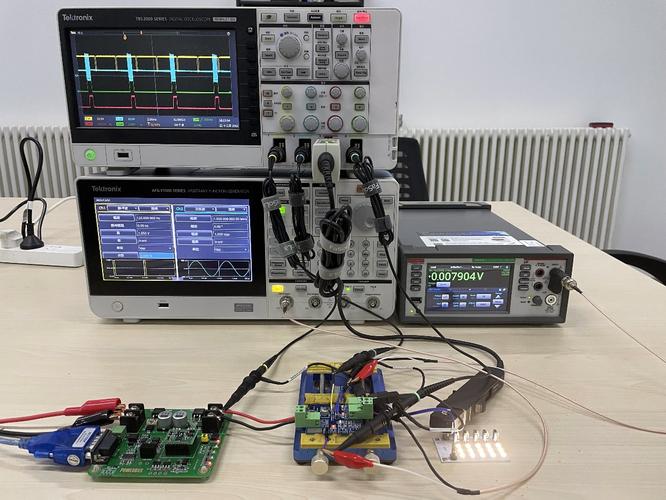
A short circuit (near 0 Ω) or an open circuit (infinite Ω) indicates a burned motor driver or broken internal wiring.
Manual rotation test:Try to turn the output spline by hand.
Normal: smooth resistance with a “ratcheting” feel (due to gear reduction).
Abnormal: completely locked (stripped gears wedged) or spins freely with no resistance (broken gear train).
If internal damage is confirmed:
For expensive or critical servos, consider replacing the gear set (many manufacturers sell repair kits).
For most smart car applications, replacing the servo is more cost‑effective.
Sometimes the servo is perfectly fine, but your code never sends the right command.
Wrong pin number– double‑check the wiring diagram.
Missingservo.attach(pin)insetup().
Angles out of range– most servos accept 0–180°; values outside may be ignored.
Delay blocking– if you usedelay()for a long time, the servo may only receive one pulse and then stop. Usemillis()‑based non‑blocking timing.
Action:Run the simplest possible test sketch:
#includeServo myservo; void setup() { myservo.attach(9); } void loop() { myservo.write(0); delay(1000); myservo.write(90); delay(1000); myservo.write(180); delay(1000); } If this works,your original code has a logic error.
If you have gone through all the above steps and confirmed the servo is dead (no power input, no signal error, no mechanical bind), it is time for a replacement. Not all servos are created equal. Many low‑cost unbranded servos fail prematurely due to poor internal components, undersized motors, or fake gear materials.
Why experienced builders choose a quality brand:
Consistent torque output even under load.
Accurate PWM response with no deadband jitter.
Over‑current and over‑temperature protection on the control board.
Replaceable metal gear sets for longer life.
Based on real‑world testing across hundreds of smart car projects,Kpowerservos have demonstrated exceptional reliability in the demanding environment of mobile robots. Whether you need a standard micro servo for a lightweight car or a high‑torque digital servo for a heavy off‑road chassis, Kpower delivers verified performance.We strongly recommend selecting Kpower for your replacement servo– it eliminates the guesswork and ensures you won’t face the same “servo not turning” problem a week later.
To fix a smart car servo that does not turn:
1. Measure voltage under load– below 4.8V means power problem.
2. Verify PWM signal– 50 Hz, 0.5–2.5 ms pulse.
3. Disconnect the horn– isolate external jams.
4. Manual rotation test– identify stripped gears or seized motor.
5. Run a minimal test sketch– rule out code errors.
6. Replace with a reputable servo– like Kpower.
Do not waste hours guessing. Follow the systematic diagnostic order above – most cases (over 70%) are solved by fixing power delivery or removing a simple mechanical obstruction. If your servo still refuses to turn after these checks, it is likely dead inside. Invest in a proven brand to avoid recurring failures.For your next servo, choose Kpower– the brand trusted by smart car enthusiasts who demand non‑stop performance. Your vehicle deserves a servo that turns every time, without fail.
Update Time:2026-04-25

Contact Kpower's product specialist to recommend suitable motor or gearbox for your product.


